Installation
Python
Make sure you have cmake installed and then you can install this package with pip:
pip install sp-svg-diagram
The sp- in the package name has no particular meaning; it is only there to avoid occupying the name for a better implementation.
A simple demo:
from sp_svg_diagram import SVGDiagram


if __name__ == "__main__":
    diagram = SVGDiagram()
    node_a = diagram.add_node("a")
    node_a.set_center(0, 0)
    node_a.set_label("foo")
    node_b = diagram.add_node("b")
    node_b.set_center(100, 60)
    node_b.set_label("bar")
    diagram.add_edge("a", "b")
    diagram.to_svg("demo.svg")
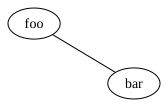
The output should look like this:
JavaScript
Install this package with npm:
npm i sp-svg-diagram
The sp- in the package name has no particular meaning; it is only there to avoid occupying the name for a better implementation.
A simple demo:
import { SVGDiagram } from 'sp-svg-diagram';
import { writeFile } from 'fs/promises';

const diagram = new SVGDiagram();
const nodeA = diagram.addNode("a");
nodeA.setCenter(0.0, 0.0);
nodeA.setLabel("foo");
const nodeB = diagram.addNode("b");
nodeB.setCenter(100.0, 100.0);
nodeB.setLabel("bar");
diagram.addEdge("a", "b");
const svg = diagram.render();
await writeFile("demo.svg", diagram.render());
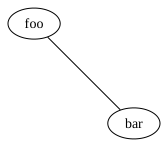
The output should look like this:
CMake
You can use FetchContent to include this library:
cmake_minimum_required(VERSION 4.0)
project(demo)

set(CMAKE_CXX_STANDARD 20)

add_executable(demo
        main.cpp
)

include(FetchContent)

FetchContent_Declare(
        SVGDiagram
        # GIT_REPOSITORY https://github.com/CyberZHG/SVGDiagram.git
        GIT_REPOSITORY git@github.com:CyberZHG/SVGDiagram.git
        GIT_TAG main
)

FetchContent_MakeAvailable(SVGDiagram)

target_link_libraries(demo PRIVATE SVGDiagram)
A simple demo:
#include "svg_diagram.h"
using namespace svg_diagram;

int main() {
    SVGDiagram diagram;
    const auto node1 = diagram.addNode("A");
    node1->setCenter(0, 0);
    node1->setLabel("foo");
    const auto node2 = diagram.addNode("B");
    node2->setCenter(100, 50);
    node2->setLabel("bar");
    const auto edge = diagram.addEdge("A", "B");
    edge->setArrowHead();
    diagram.render("demo.svg");
    return 0;
}
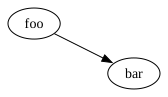
The output should look like this:
Optional Requirements
By default, this library estimates text dimensions using approximations. For more accurate measurements, PangoCairo can be enabled.
To install PangoCairo:
MacOS:
brew install cairo pango pkg-config
Linux:
sudo apt install libcairo2-dev libpango1.0-dev pkg-config
To enable PangoCairo, add the following to your CMake options:
-DSVG_DIAGRAM_ENABLE_PANGO_CAIRO=ON
Development
To enable tests, add the following to your CMake options:
-DSVG_DIAGRAM_BUILD_TESTS=ON