Basic Concepts
SVGDiagram
SVGDiagram serves as the entry point for most operations. Through this class, you can create basic nodes (SVGNode), edges connecting two nodes (SVGEdge), and subgraphs (SVGGraph) that control default properties for some nodes and edges. Once all editing is complete, SVGDiagram can generate an SVG, with the SVG’s dimensions automatically adjusted to encompass all visible elements.
To create a SVGDiagram and generate an empty SVG:
from sp_svg_diagram import SVGDiagram

diagram = SVGDiagram()
diagram.to_svg("empty.svg")
import { SVGDiagram } from 'sp-svg-diagram';

const diagram = new SVGDiagram();
const svg = diagram.render();
#include "svg_diagram.h"

int main() {
    svg_diagram::SVGDiagram diagram;
    diagram.render("empty.svg");
    return 0;
}

SVGNode
SVGNode is used to display text along with its border. It automatically calculates the border size based on the text dimensions. However, it should be noted that the text size is only an approximate estimate. A more precise method, which relies on third-party libraries, is provided only in the C++ implementation, and the corresponding compilation option is disabled by default.
The two most important properties of SVGNode are its center and its text. By default, all values related to position or size are measured in points. When creating a node with SVGDiagram, the function’s input parameter is the node’s ID, which must be unique within a single diagram.
from sp_svg_diagram import SVGDiagram

diagram = SVGDiagram()
node = diagram.add_node("A")
node.set_center(0, 0)
node.set_label("foo\nbar")
diagram.to_svg("node.svg")
import { SVGDiagram } from 'sp-svg-diagram';

const diagram = new SVGDiagram();
const node = diagram.addNode("A");
node.setCenter(0.0, 0.0);
node.setLabel("foo\nbar");
const svg = diagram.render();
#include "svg_diagram.h"
using namespace svg_diagram;

int main() {
    SVGDiagram diagram;
    const auto node = diagram.addNode("A");
    node->setCenter(0, 0);
    node->setLabel("foo\nbar");
    diagram.render("node.svg");
    return 0;
}
SVG output:

SVGEdge
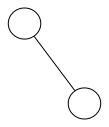
SVGEdge is used to connect two SVGNode instances. When creating an edge through SVGDiagram, the function takes the IDs of the two nodes as input, where the first parameter corresponds to the edge’s ‘tail’ and the second to its ‘head’. By default, no arrow is drawn; the edge is represented simply as a straight line. It should be noted that this is merely a drawing library and does not provide any automatic layout functionality.
from sp_svg_diagram import SVGDiagram

diagram = SVGDiagram()
node1 = diagram.add_node("A")
node1.set_center(0, 0)
node2 = diagram.add_node("B")
node2.set_center(60, 80)
diagram.add_edge("A", "B")
diagram.to_svg("node.svg")
import { SVGDiagram } from 'sp-svg-diagram';

const diagram = new SVGDiagram();
const node1 = diagram.addNode("A");
node1.setCenter(0.0, 0.0);
const node2 = diagram.addNode("B");
node2.setCenter(60.0, 80.0);
diagram.addEdge("A", "B");
diagram.toSVG("demo.svg");
#include "svg_diagram.h"
using namespace svg_diagram;

int main() {
    SVGDiagram diagram;
    const auto node1 = diagram.addNode("A");
    node1->setCenter(0, 0);
    const auto node2 = diagram.addNode("B");
    node2->setCenter(60, 80);
    diagram.addEdge("A", "B");
    diagram.render("edge.svg");
    return 0;
}
SVG output:
SVGGraph
SVGGraph is used to specify default properties for certain nodes or edges. By default, it is not rendered. However, if a border or fill color is set, it will draw a rectangle that encompasses all its child elements. SVGDiagram itself also creates an SVGGraph by default to serve as the top-level container.